Ultimate Caller ID Screen HD10.3.9
Publisher Description
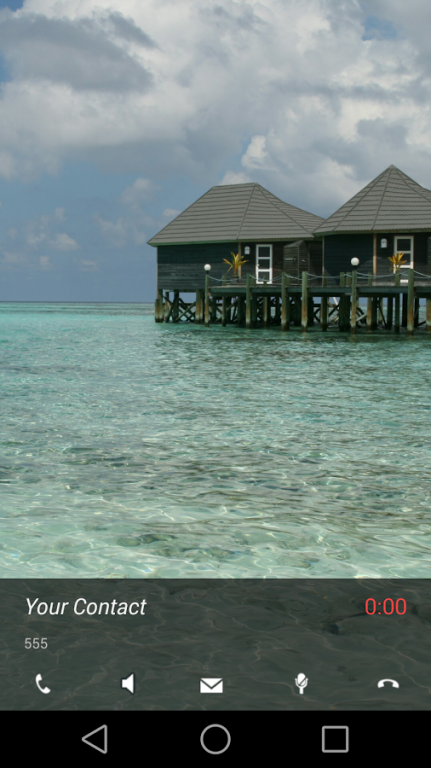
Much more than a Fullscreen Caller ID replacement, UCS combines HD Full Screen Caller ID, Video Caller ID, Fullscreen SMS text receiver and Call Blocker function in a single app. The most complete fullscreen caller ID replacement on Google Play, UCS is much more than a simple call ID app with big pictures.
Basic Features
- Full Screen Caller ID replacement with true HD pictures of your contacts
- Full Screen Video ID
- Full Screen SMS notifications and Browser
- Full Screen Missed Calls notifications
- Unprecedented theming options, including 11 free themes
- Call Blocker
- Sensor-base actions such as rejecting calls by turning the phone screen-down
- AND configurable swipe gestures just to be sure you handle your phone any way you want to
Basic Usage
- Choose pictures from gallery, camera or link to Facebook friends using their HD profile pictures
- Choose Videos from your gallery to use as full screen caller ID
- Apply pictures to contacts directly from your gallery or any picture source with the android "share" function. Just choose "Add to UCS"!
- Answer calls with buttons, sliding buttons, rotary buttons, swipe gestures... You choose!
- Hangup calls, put on speaker or mute ringer simply by turning the phone screen-down!
- Set up swipe gestures to reject and answer calls, reject with sms, reply to sms, ...
- Block contacts, unknown and private numbers, and even all numbers starting with
- Get full screen HD notifications of your SMS
- Get full screen HD notificationsof your missed calls, dismiss, callback or answer either with buttons or configurable swipe gestures
- Theme both Call ID and SMS screens, personalizable per contact
- Sync your UCS HD pictures to your phonebook
- Hide incoming call and SMS details from prying eyes until it's safe to pick-up/read with UCS Privacy Screen
Advanced Features
- Use your current android contact picture as fullscreen caller ID (Licensed only!)
- Selectively enable only for outgoing/incoming calls
- Sync your android contact database to use your UCS-defined callscreen HD pictures, or batch-upload a set of pictures from your sdcard
- Hide parts of the call screen for cleaner interface.
- Option to make incoming SMS show above lockscreen, including turning the screen on
- Browse through your missed calls, allways in full screen with your contact's HD pictures
- You can ALWAYS go back to the default phone interface during a call, simply by pressing the phone "Back" while on a call
- Much MUCH more! Take a look through the available settings!
Getting Started and Important Notes
- To use the dialpad and other in-call functions, press the "Back" button on a call to bring up the default phone interface! Due to security restrictions imposed by Google, it's impossible for me to provide a working dialer during an ongoing non-VoIP call.
- Please note that there is a personalizable contact limit of 6 contacts on the free version
Any issue, don't hesitate to contact me, just drop me an email with any issue you may have. Follow me on twitter: https://twitter.com/LowveldWare
Enjoy
About Ultimate Caller ID Screen HD
The company that develops Ultimate Caller ID Screen HD is Lowveld. The latest version released by its developer is 10.3.9. This app was rated by 1 users of our site and has an average rating of 3.0.
To install Ultimate Caller ID Screen HD on your Android device, just click the green Continue To App button above to start the installation process. The app is listed on our website since 2015-01-29 and was downloaded 22 times. We have already checked if the download link is safe, however for your own protection we recommend that you scan the downloaded app with your antivirus. Your antivirus may detect the Ultimate Caller ID Screen HD as malware as malware if the download link to com.lowveld.ucs is broken.
How to install Ultimate Caller ID Screen HD on your Android device:
- Click on the Continue To App button on our website. This will redirect you to Google Play.
- Once the Ultimate Caller ID Screen HD is shown in the Google Play listing of your Android device, you can start its download and installation. Tap on the Install button located below the search bar and to the right of the app icon.
- A pop-up window with the permissions required by Ultimate Caller ID Screen HD will be shown. Click on Accept to continue the process.
- Ultimate Caller ID Screen HD will be downloaded onto your device, displaying a progress. Once the download completes, the installation will start and you'll get a notification after the installation is finished.
Program Details
System requirements
Download information
Pricing
Version History
version 10.3.9
posted on 2015-01-29
Lollipop users can now answer calls inside UCS
version 9.7.2
posted on 2013-06-17
Several fixes and updates
